ADAPTIVE LEARNING & SETTINGS
A risk baseline calibrated to you —
not a generic threshold.
A scalper and a swing trader should never share the same yardstick. Meridian starts from the rules you set, then learns how you actually trade — your window, your size, your hold time, your re-entry rhythm. Every session, the baseline gets sharper, and so does the detection.
Free forever, no card · Guard $29.99/mo when you want enforcement · Cancel anytime
WHY A PERSONAL BASELINE
A generic threshold flags the wrong things.
Three contracts is reckless for one trader and a quiet Tuesday for another. Meridian measures everything against your normal, so the same drift means the same thing every time.
HOW IT WORKS
Two layers. One reference point.
Your settings define the structure. Learning makes it personal.
The structure you declare
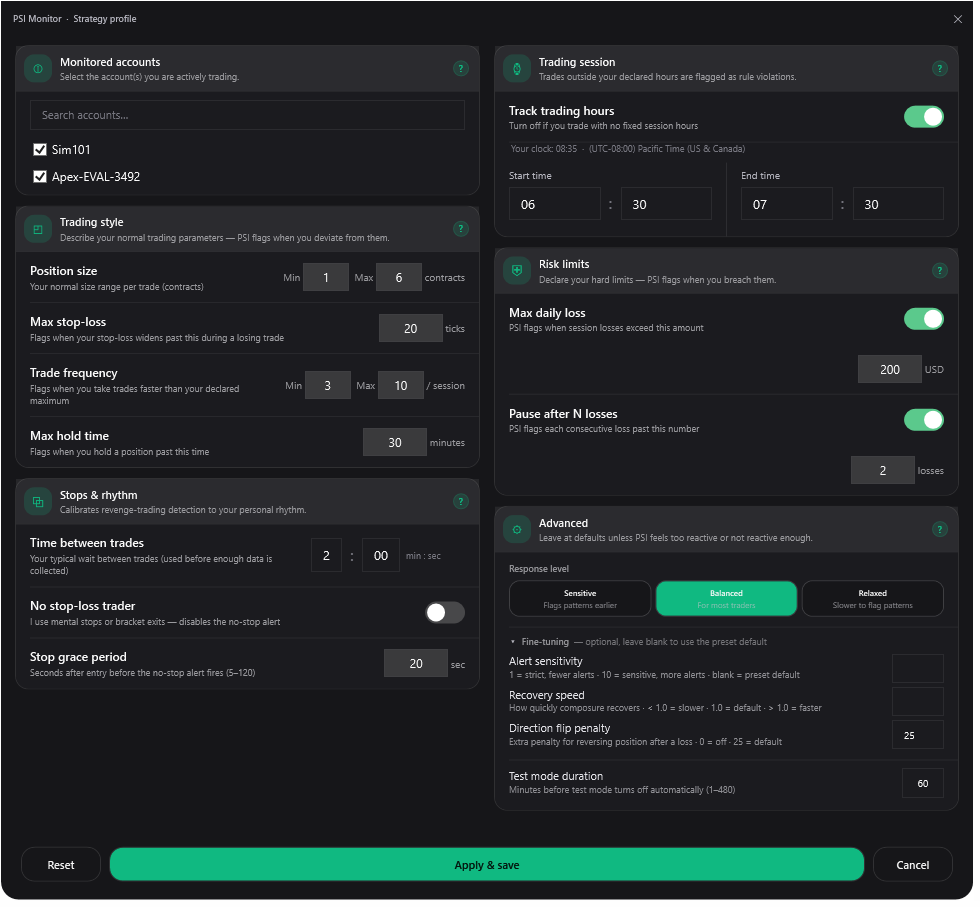
Before you have any history, you tell Meridian the shape of how you trade: your session window, typical size, entry frequency, stop conventions, and risk limits. That gives detection a sensible starting point on day one, calibrated to your style instead of an industry average.
The normal it learns
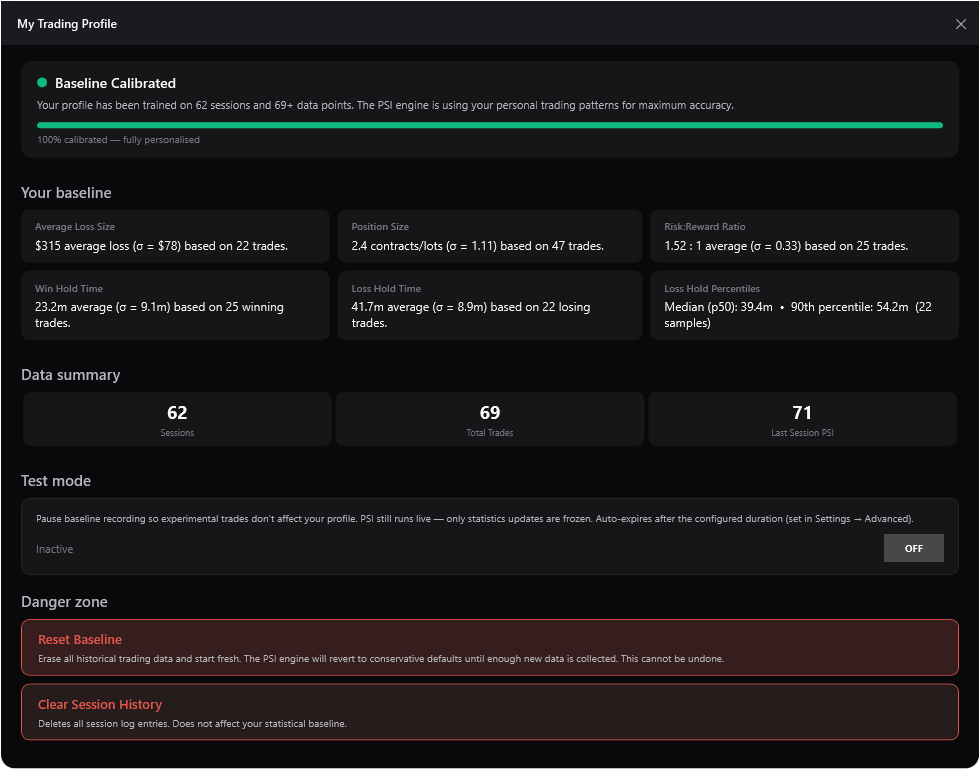
After every session, Meridian updates what it knows about how you actually trade — size, hold time, loss magnitude, entry pace. As sessions accumulate, observed behavior gradually takes over from your declared settings as the reference point. The longer you trade, the sharper it gets.
Day one, your settings carry the load.
By session 30, your own behavior is the yardstick.
WHAT YOU CONFIGURE
Set your rules once.
Your profile covers the shape of how you trade and the lines you hold yourself to. Set it once — the baseline handles the rest.
Trading window & schedule
- ✓Session start and end time
- ✓Disable the window check entirely if you trade without a fixed schedule
Size & frequency
- ✓Normal position-size range — min and max contracts
- ✓Expected trades per session — min and max
- ✓Typical rest time between trades
Hold-time & re-entry rules
- ✓Maximum losing-trade hold time
- ✓Pause-after-N-losses rule for re-entry rhythm
- ✓Maximum stop-loss width, in ticks
- ✓No-stop-loss trader mode — skips the no-stop alert for traders who trade without stops
Risk limits
- ✓Maximum daily loss in USD (optional)
- ✓These limits are Guard's enforcement triggers
- ✓Set them when you're calm; Guard enforces them when you're not — blocking added risk at the line you drew
Response sensitivity
- ✓Three response presets — Sensitive, Balanced, Relaxed
- ✓Each preset shifts how fast PSI reacts and recovers
- ✓Optional Fine-tuning — alert sensitivity, recovery speed, and the direction-flip penalty
Account selection & test mode
- ✓Choose which accounts Meridian monitors — or monitor all by default
- ✓Exclude automated-strategy fills from PSI and the baseline
- ✓Test Mode runs PSI live
- ✓Market Replay sessions are excluded from learning automatically
HOW IT MATURES
It gets more accurate, not more generic.
Most tools are as smart on day one as they'll ever be. Meridian is the opposite — the more you trade, the more it knows what's actually normal for you.
Early sessions
Lenient on purpose
Your declared settings do most of the work, and detection runs a little looser — there isn't enough data yet to be precise about what's normal for you, so Meridian won't pretend otherwise.
After ~30 sessions
Sharp, and yours
The baseline now has enough history to reflect your real behavior. Thresholds tighten because the system knows your actual size, hold time, and pace — not just what you typed at setup.
And if your style changes, there's nothing to reset. The baseline keeps updating every session and drifts naturally toward your new behavior over time.
SENSITIVITY PRESETS
How loud the warnings get.
Presets control how quickly PSI responds to behavioral pressure — a separate dial from the baseline that decides what counts as normal.
Sensitive
Earlier warnings, faster PSI drops, slower recovery. More frequent alerts in exchange for catching pressure sooner.
Balanced
Catches meaningful behavioral drift without firing on routine variation. The right starting point for most traders.
Relaxed
Higher thresholds — PSI only moves on more extreme behavior. For disciplined traders who want signals reserved for genuine outliers.
Your history lives local-first — never your name, broker credentials, account numbers, or funds.
Adaptive learning sharpens detection; it never overrides the hard limits you set. Your declared rules are always the floor.
Audited and approved by NinjaTrader's Compliance, QA & Executive teams before listing in the official Ecosystem. Runs natively inside NinjaTrader 8.
Detection that knows
how you trade.
Set your rules once. Every session, the baseline sharpens — fewer false signals, clearer feedback, calibrated to you.
Free forever, no card · Guard $29.99/mo, cancel anytime · NinjaTrader 8 today · Tradovate & Ironbeam early access