MERIDIAN GUARD · THE ENFORCEMENT LAYER
Willpower is not
a risk strategy.
You write the rules when you're calm. Guard enforces them when you're not — escalating exactly as far as you decide, from a quiet nudge to a hard cutoff between you and the next order. No decision required from the tilted version of you.
On NinjaTrader 8, your first 7 days on a free license include Guard, no card · Then $29.99/mo · Cancel anytime
WHY GUARD EXISTS
Two different people make
these two decisions.
The trader who sets a daily loss limit at 8am is calm, rested, and rational. The trader who wants to override it at 11am — three losses deep — is not. Guard puts the calm one in charge of the day.
- ✓Pick the triggers that mean "I'm done for today"
- ✓Choose how hard each one bites
- ✓Optionally lock the settings shut
This version of you writes the rules.
- × Wants to "make it back" with one more trade
- × Wants to widen the stop just this once
- × Wants to switch the limits off
This version doesn't get a vote.
Behavioral economists call this a commitment device — a mechanism you set up in advance to constrain your future self.
Institutional desks have compliance systems that do it automatically. Guard is that, for you.
STEP 1 · THE 6 TRIGGERS
Decide what "too far" means.
Six conditions Guard watches every session — the same six on every platform. Pick the ones that matter to you and set the numbers. Each fires once on entry, then resets — no nagging.
Psychological stability drops under a threshold you define.
N losses in a row within the same session.
Daily realized P&L falls past your declared limit.
Open position floating loss exceeds your threshold — before you close.
One trade loses more than a defined amount.
You have traded longer than you planned for the day.
Five of these are the same hard numbers a traditional risk tool gives you — daily loss, single-trade loss, drawdown, loss streak, session length. The sixth, PSI Below, fires on the behavior itself, before the money moves.
STEP 2 · THE ESCALATION LADDER
Then decide how hard it bites.
The same trigger can be a whisper or a wall — you set the level. The ladder differs by where Guard runs: five response levels inside NinjaTrader 8, six tiers on the standalone Tradovate & Ironbeam apps. Same engine, honest differences.
- L1 Notify
A quiet toast notification. Stays out of the way of execution.
- L2 Risk Alert
A persistent HUD banner that stays up while the condition holds and clears on its own. Non-blocking — it keeps the risk in your face, it does not gate entries.
- L3 Acknowledge
Type your own pre-written phrase and wait out a countdown before continuing. This is the level that blocks the entry until you confirm.
- L4 Trading Pause
Blocks new entries entirely by cancelling orders. Survives NT8 restart.
- L5 Disconnect
Severs broker connection. Optional re-disconnect if you try to bypass.
Inside NinjaTrader 8, the hardest stop is a broker Disconnect — Guard severs the connection and cancels working orders. There is no firewall Cut or broker-side lock here; those are standalone-only.
- T1 Notify
Just shows a message. Doesn't stop you.
A brief banner in the HUD corner. Informational only — it never touches execution.
- T2 Alert
Shows a message and reads it aloud.
A persistent HUD warning banner that also reads the message aloud, until the condition clears. Non-blocking.
- T3 Acknowledge
Makes you stop and type a phrase.
A blocking dialog you must dismiss — optionally by typing your own pre-written phrase and waiting out a countdown.
- T4 Pause
Stops new trades. You can still exit.
Cancels new entry orders for the window and re-checks broker truth so no stray order re-opens a position. You stay connected and can always close or reduce — exits and stops are never touched.
- T5 Cool-down Wall
Covers your screen so you step away.
A full-screen cool-down takeover with guided breathing and a countdown. If you hold a position it first offers flatten/manage — it never traps an open trade. You choose a soft wall (can Alt-Tab) or a hard wall (re-asserts focus).
- T6 Cut
Blocks orders from leaving your PC.
Cuts this PC's network path to the broker's order servers via the Windows firewall — a blunt, machine-wide block, so an order physically cannot leave. The one stop that holds even a market order from that PC (a phone or second device is outside it). Needs admin rights; lifts automatically when the window ends.
The standalone apps connect straight to your Tradovate or Ironbeam account — no NinjaTrader — so the top two tiers go where an in-platform add-on can't: a full-screen Cool-down Wall and a Windows-firewall Cut. There is no broker Disconnect tier here.
The most underrated level — Acknowledge
"I will not revenge trade. My plan is my edge."
You write that phrase yourself, when you're calm, before the session. In the moment, Guard makes you type it back — word for word, against a countdown — before it lets you continue. Your own words, at the exact second you need them most. Often that's all it takes to break the loop.
THE HONEST PART · WHAT ACTUALLY HOLDS
A lock is only as strong as where it lives.
Every Guard action sits at one of three layers — and the layer is exactly what a determined, tilting trader can or can't get around. We'd rather you know this up front than find out at the worst moment.
Notify, Alert/Risk Alert, Acknowledge, Pause, Cool-down Wall, Strict Lock and Hard limits all live in the app. They put hard, deliberate friction between you and a tilt trade — the kind your in-the-moment self won't push through. They don't pretend to stop someone who closes the app and trades from their phone.
Cut (standalone) blocks your broker's order servers in the Windows firewall. It's machine-wide: an order physically cannot leave that PC — the one stop that holds even a market order from that machine. A phone or a second device is outside it.
On Tradovate demo and eval accounts, the standalone app writes Tradovate's own liquidate-only lock — enforcement at the broker, not in our app. That one holds even if you close the app, reboot, or log in from another device. It's the real answer to "can a tilting trader just keep going?" (Funded/live Tradovate and Ironbeam don't expose this API; NinjaTrader has no broker-side lock — there, enforcement is app/connection-level only.)
So when we say un-bypassable, we mean exactly one thing: the broker-level lock. Everywhere else, Guard sells honest friction — the version of you that's tilting can't talk its way past it, and that's usually all it takes.
STANDING ENFORCEMENT · HARD LIMITS
A ceiling that's
always on.
The triggers above react to a session going wrong. Hard limits don't wait for anything — they're a standing cap you set once while calm. A max-contracts ceiling and blocked entry order types, enforced on every order, all session.
- ✓A resting order over the cap, or of a blocked type, is cancelled at submission
- ✓A market order that slips through is trimmed back to the cap — a single round-trip, never your existing position
- ✓Closing or reducing is never blocked
Guard tier, off by default — on both NinjaTrader 8 and the standalone apps. This is the literal contract cap the old size-limiter tools sell, built into the behavioral layer.
Set once, holds all session
STRICT LOCK
A lock only your calm self
can set — and your tilted
self can't undo.
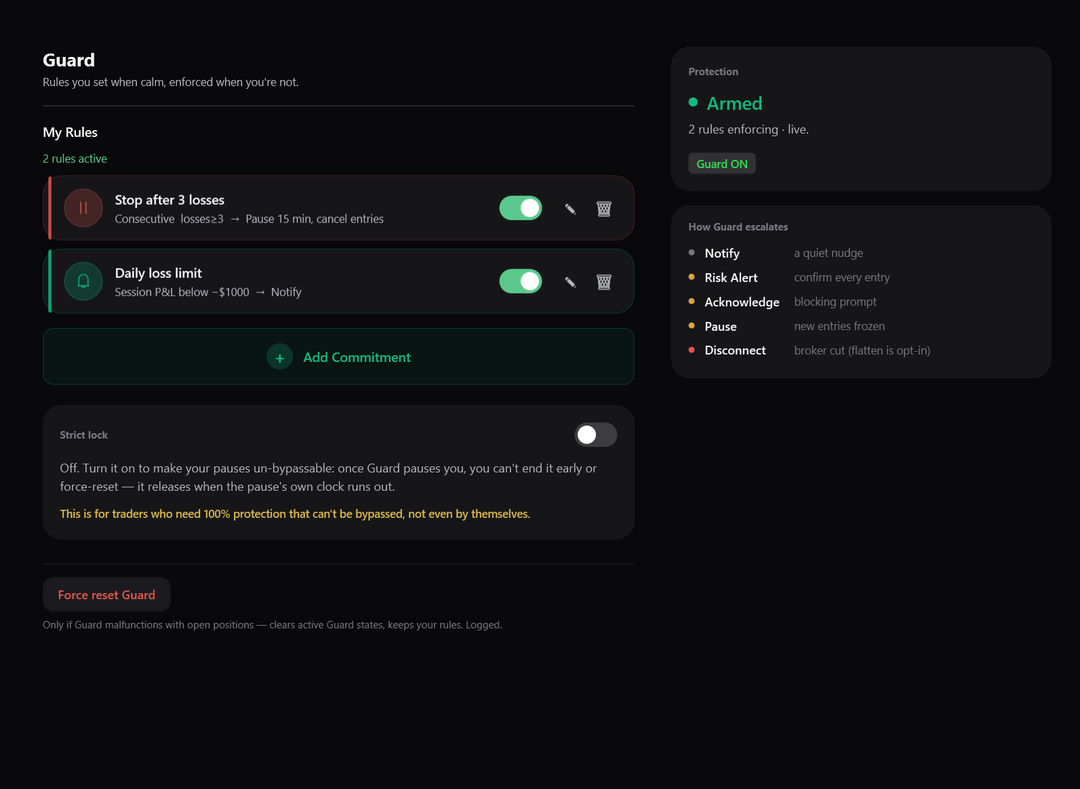
Any rule you can switch off in the moment isn't really a rule. Strict Lock is the fix: one switch, set while you're calm. With it on, for a pause's full window it removes the in-app escape hatches — no early exit, no force-reset, Guard can't be turned off, your rules are frozen — until the clock releases you. It's the lock your tilted self can't talk its way out of.
- ✓Your rule decides how long — 15 minutes or the rest of the day — Strict Lock makes that window stick
- ✓It survives a NinjaTrader restart or crash — closing the platform doesn't reset it
Strict Lock is in-app friction, not a device-proof lock — the one stop that holds across devices is the Tradovate eval/demo broker lock above.
WHAT GUARD WILL NOT DO
Guard never closes your live
positions for you.
It only blocks you from adding risk — new entries, more size. Your open trades stay yours: a close order is never cancelled, at any level. Even Disconnect, if you hold a position, first shows a countdown with a one-click Flatten All before it severs the connection — and your position itself lives at your broker, never locked away.
The one exception is explicit and off by default: on a Trading Pause (L4) or Disconnect (L5) rule, you may tick a single checkbox — Close all open positions immediately — to auto-flatten the moment that rule fires. If you don't enable it, nothing closes — positions stay open and fully under your control.
PUT TOGETHER
A trigger, a level, a rule.
Pair any trigger with any level and you've written an enforceable rule. The examples follow the platform you picked above.
Daily Loss Limit
When: P&L below -$500
Then: Disconnect (Broker)
Revenge Trade Check
When: 3 consecutive losses
Then: Acknowledge + 60s Countdown
Tilt Early Warning
When: PSI below 65
Then: Notify
Hard Tilt Stop
When: PSI below 45 + P&L below -$300
Then: Trading Pause (Cancel Orders)
Position Risk Monitor
When: Unrealized below -$400
Then: Risk Alert
Session Length Rule
When: Session over 180 minutes
Then: Acknowledge required
Daily Loss Limit
When: P&L below -$500
Then: Cut (firewall block)
Revenge Trade Check
When: 3 consecutive losses
Then: Acknowledge + phrase
Tilt Early Warning
When: PSI below 65
Then: Notify
Hard Tilt Stop
When: PSI below 45 + P&L below -$300
Then: Cool-down Wall
Position Risk Monitor
When: Unrealized below -$400
Then: Alert
Session Length Rule
When: Session over 180 minutes
Then: Pause (Cancel Orders)
Min loss filter
Ignore fee-sized scratches in consecutive-loss streaks.
Auto-flatten
Optionally close all open positions when a pause activates.
Pause persistence
Lockout survives NinjaTrader restart or crash.
Emergency Reset
One click clears all active Guard state if you need an out.
INCLUDED ON EVERY PLAN · INTEL LAYER
Your session history,
turned into decisions.
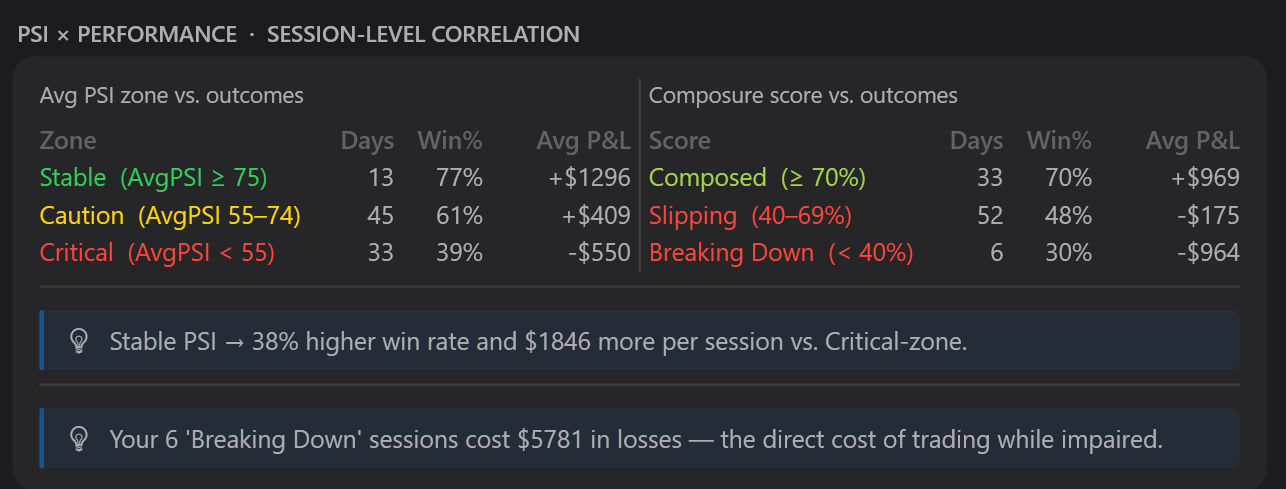
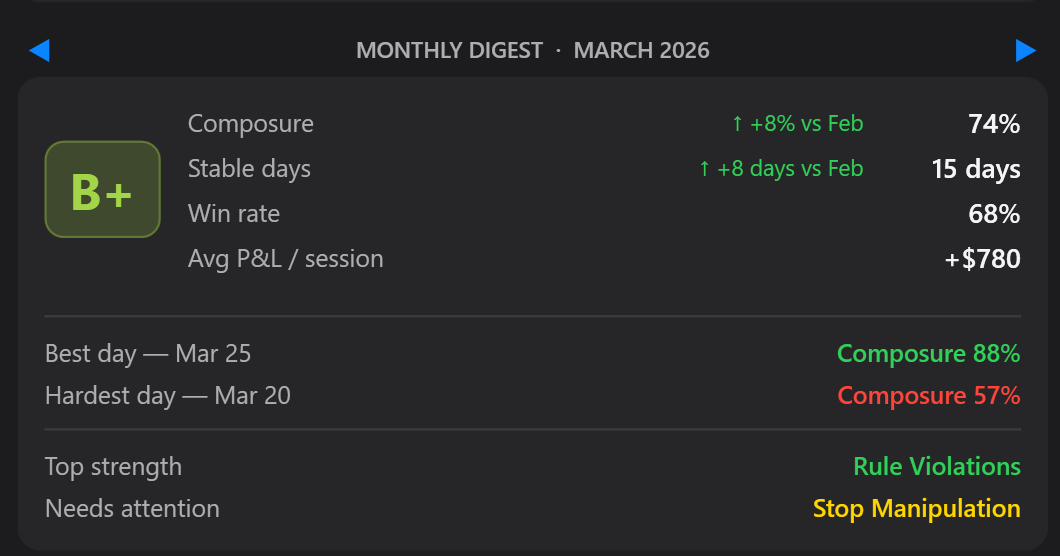
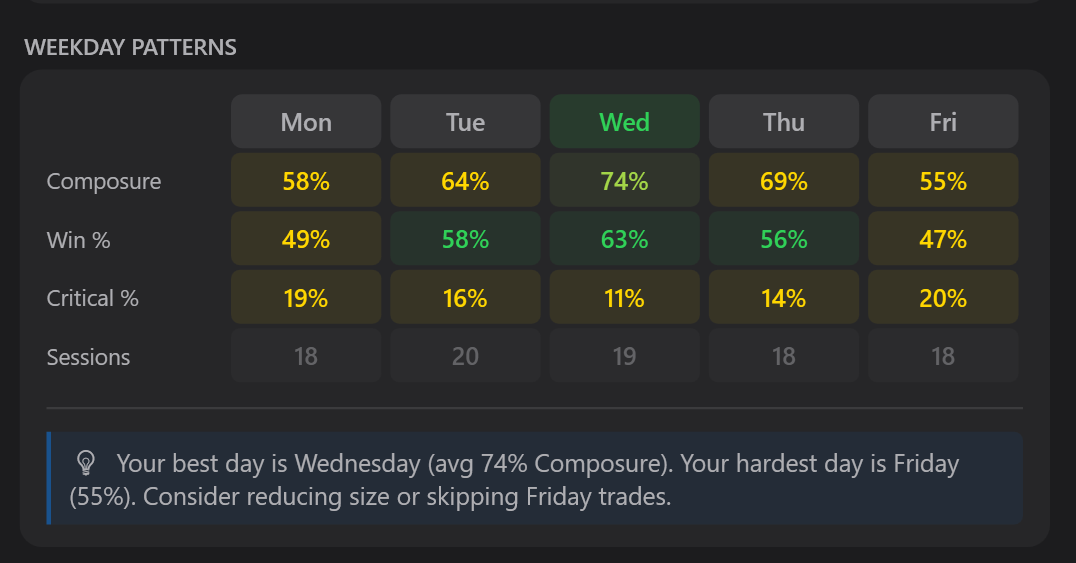
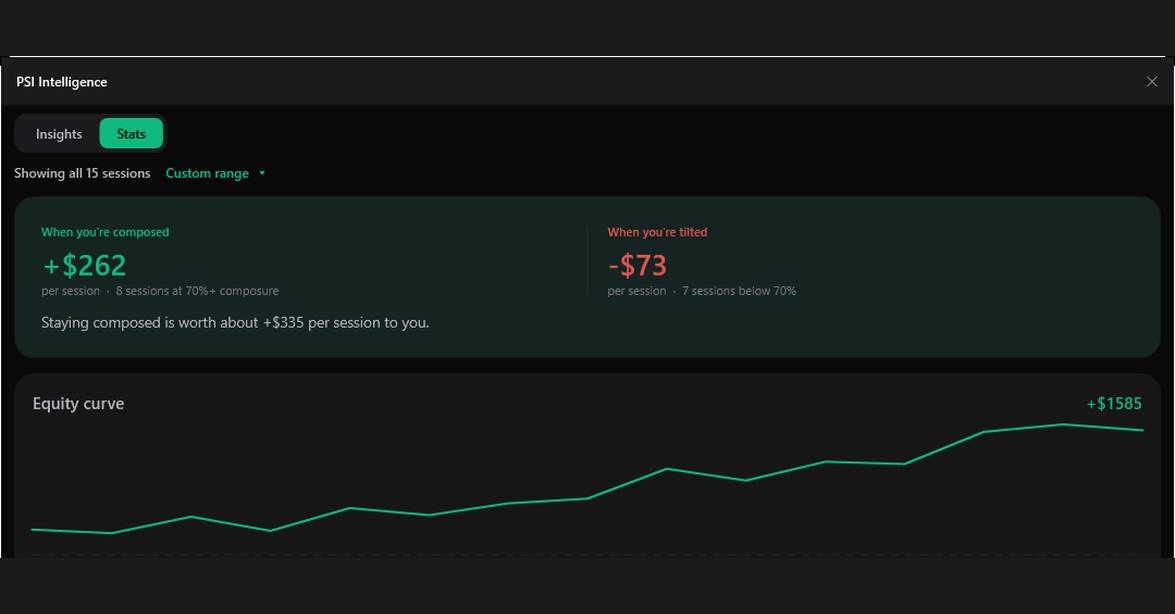
The Intel Layer ships with Meridian Core, so every Guard plan has it too. Five years of session history, kept locally, surfacing the patterns no single session reveals — so the rules you set tomorrow are sharper than the ones you set today.
CORE VS GUARD
Guard is Core, plus enforcement.
Everything the monitor does — the Intel Layer included — and the layer that acts on it.
Free
$29.99/mo
IN THE MOMENT
What Guard actually does when it happens.
Three sessions every futures trader recognizes. No predictions, no advice — just the mechanism.
Scenario 1
The revenge spiral
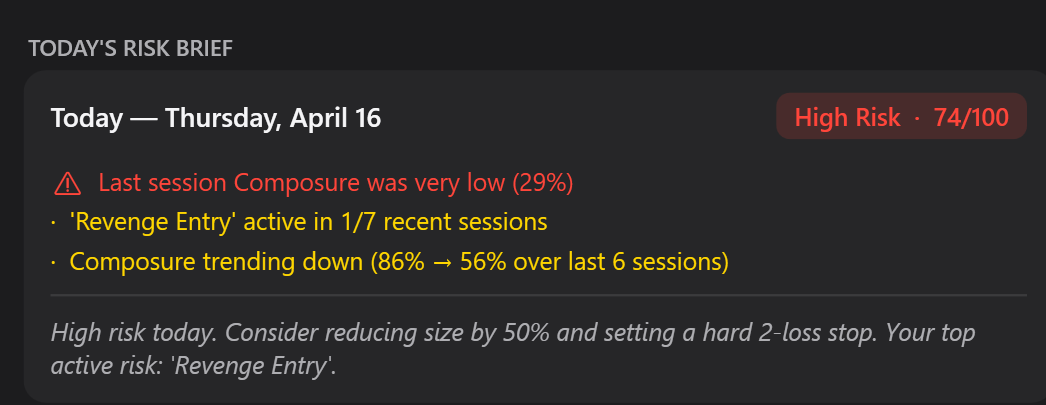
Two quick losses, and you are back in the order ticket within seconds. Meridian's Revenge Entry signal fires on the rapid re-entry, PSI drops, and the Guard rule you set when calm steps in — a typed acknowledgment with a countdown, or a straight entry block until the cooldown you chose has passed.
Scenario 2
The widening stop
A loser grows, and the protective stop starts edging away from price. Stop Manipulation and Size Spike score the behavior against your own baseline, the Risk Alert banner goes persistent, and a Trading Pause blocks new adds. Your exits and protective orders are never touched — you can always get out.
Scenario 3
The marathon session
You declared a two-hour window and a trade budget, and both are gone — but the entries keep accelerating. Rule Violations and Overtrading Pace push PSI down, and Guard escalates exactly as far as you pre-committed: notify, acknowledge, pause — up to a broker disconnect on NinjaTrader, or a Cool-down Wall and firewall Cut on the standalone apps.
Set the rules once.
Let them hold the line.
Everything in Meridian Core — the Intel Layer included — plus the Guard System, Hard limits, and Strict Lock. $29.99 a month, cancel anytime.
Meridian Core stays free · Cancel Guard anytime · NinjaTrader 8, or standalone for Tradovate & Ironbeam